Designing the Mini Payroll Feature for HumanManager
A simplified Mini Payroll Experience for Growing Businesses on HumanManager

Role
Senior UX Designer (Lead)
Company
HumanManager (a subsidiary of SystemSpecs Holdings Group)
Team
1 Product Manager, 2 UX Designers, 4 Engineers, 1 QA Analyst
Duration
16 weeks (Discovery to Launch)
Tools
Figma, FigJam, Maze, Hotjar, Google Analytics, Miro
Overview
HumanManager, developed by SystemSpecs Holdings Group, has been a trusted name in payroll and human resource management across Africa for nearly three decades. The platform serves over 900 businesses across 14 Nigerian states and five African countries: Nigeria, Ghana, Benin, Zimbabwe, and Rwanda. In 2022, HumanManager was recognised with the "Best Workforce Benefits Management Solution" award at the Nigerian Fintech Awards, cementing its position as the continent's premier HR and payroll software.
With the launch of HumanManager 7.0, the company introduced a modular architecture offering Basic, Premium, and Enterprise tiers. This strategic shift aimed to make the platform accessible to organisations of any size, structure, and location. However, a critical gap remained: while the Enterprise payroll module served large organisations well, small and medium-sized enterprises (SMEs), the fastest-growing segment of the Nigerian economy, found the existing payroll system overwhelming, expensive, and misaligned with their operational realities.
I was brought on as the Senior UX Designer to lead the design of a new Mini Payroll feature, a streamlined, guided payroll experience purpose-built for businesses with 1 to 50 employees. This feature would sit within HumanManager's Basic tier and needed to balance simplicity with full compliance to Nigerian statutory requirements, including PAYE (Pay As You Earn), NHF (National Housing Fund), Contributory Pension, NSITF (Nigeria Social Insurance Trust Fund), and ITF (Industrial Training Fund).
⚠️This case study represents work completed as Senior UX Designer at HumanManager. Specific metrics have been contextualised for portfolio presentation. The Mini Payroll feature is live and available as part of HumanManager's Basic tier.
Problem Statement
The Business Challenge
HumanManager's existing payroll module was designed for enterprise-grade organisations with dedicated HR departments. As the company expanded its reach to SMEs through the Basic tier of HumanManager 7.0, product analytics revealed a troubling pattern: small businesses were signing up at an encouraging rate, but the vast majority were abandoning the payroll setup process before completing their first pay run.
Quantifying the Problem
Metric | Value |
SME sign-ups (6-month period) | 2,840 new accounts |
Payroll setup completion rate | 34% |
First successful pay run | Only 22% of sign-ups |
Average time to first payroll | 14 business days |
Payroll-related support tickets | 145 per month |
Churn rate (SME segment, 90-day) | 61% |
Revenue impact (lost SME subscriptions) | Approximately ₦186 million annually |
The data told a clear story: HumanManager was losing the SME market not because of a lack of features, but because the existing payroll experience was built for a different user entirely. Small business owners and their lean admin teams did not have the HR expertise, time, or patience to navigate a system designed for organisations with 500+ employees.
The Human Cost
Beyond the business metrics, there was a real human cost. Small business owners across Nigeria were defaulting to manual spreadsheet-based payroll a practice that led to calculation errors averaging 23% of pay runs, late salary payments that damaged employee trust, compliance violations that exposed businesses to penalties from the Federal Inland Revenue Service (FIRS), and an enormous time burden that pulled founders away from growing their businesses.
"I signed up for HumanManager because I heard it was the best. But when I opened the payroll section, I felt like I needed an accounting degree just to pay my 12 staff. I went back to my Excel sheet." — Small business owner, Lagos
Design Challenge
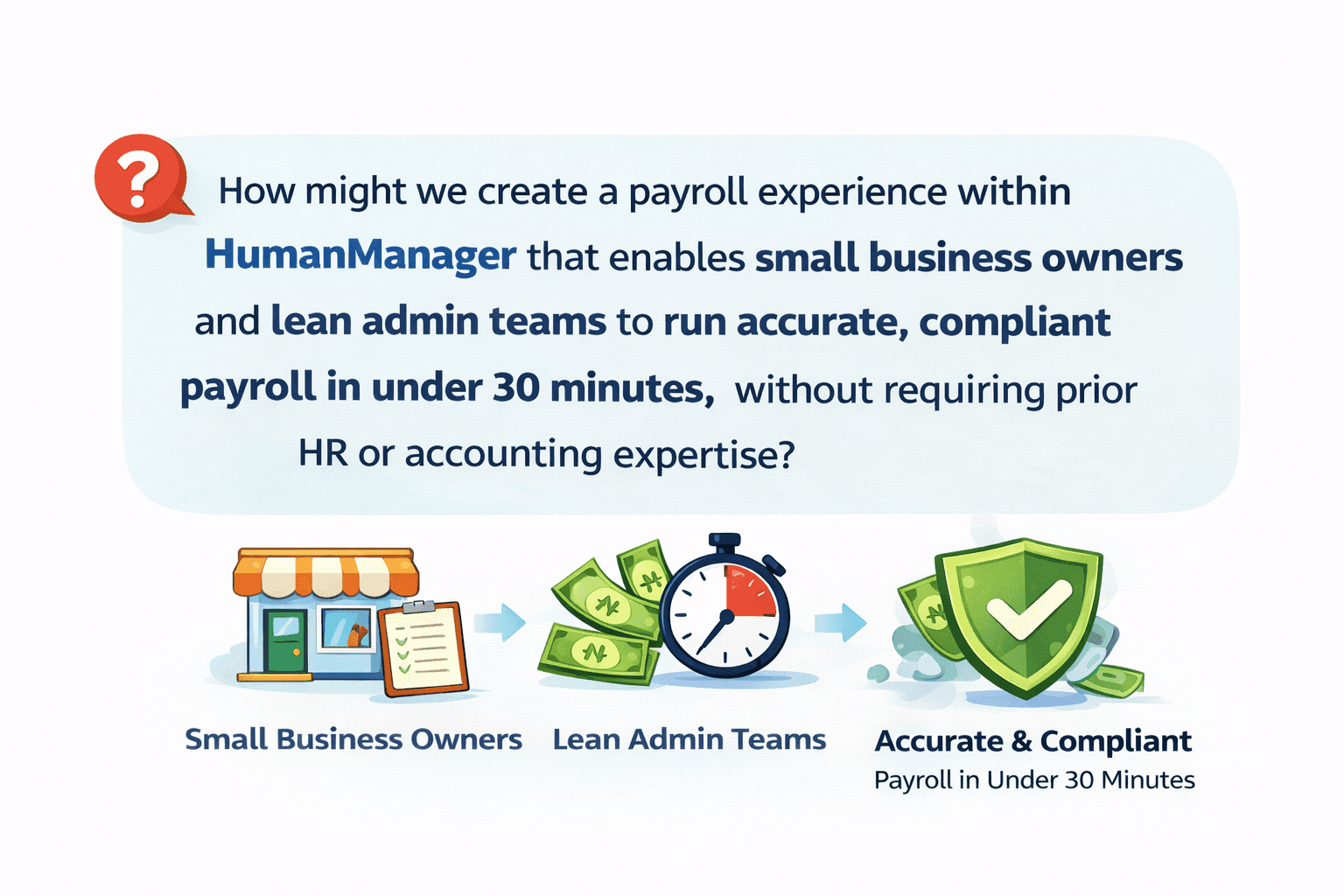
How might we create a payroll experience within HumanManager that enables small business owners and lean admin teams to run accurate, compliant payroll in under 30 minutes, without requiring prior HR or accounting expertise?
Success Criteria
The project defined four measurable success criteria that would guide all design decisions throughout the engagement.
Success Metric | Target |
Payroll setup completion rate | From 34% to 75%+ |
Time to first successful pay run | From 14 days to under 3 days |
Payroll calculation error rate | From 23% to under 3% |
SME 90-day retention rate | From 39% to 65%+ |
Research & Discovery
Research Objectives
The research programme was designed to answer four fundamental questions. First, what specific barriers prevent SME users from completing payroll setup? Second, what mental models do small business owners bring to payroll processing? Third, what level of compliance knowledge exists among our target users? And fourth, how do competing solutions address the SME payroll challenge in the Nigerian market?
Research Methods
The team employed a multi-method research approach over a four-week discovery period, combining quantitative analytics with deep qualitative investigation.

Method | Scope | Key Focus |
User Interviews | 18 sessions across Lagos, Abuja, and Port Harcourt | Understanding payroll workflows, pain points, and mental models |
Usability Testing | 14 moderated sessions with the existing payroll module | Identifying specific friction points in the current experience |
Survey | 342 responses from SME owners and admin staff | Quantifying pain points and feature priorities |
Analytics Review | 6 months of behavioural data | Drop-off analysis, feature usage patterns, error rates |
Stakeholder Workshops | 8 sessions with Product, Engineering, Compliance, Sales | Aligning on constraints, technical feasibility, and business goals |
Competitive Audit | 6 tools (PayDay HCM, PaidHR, SeamlessHR, BambooHR, Gusto, Deel) | Benchmarking SME payroll experiences |
Key Research Findings
Finding 1: The Terminology Barrier. Analytics showed that 47% of users who abandoned payroll setup did so at the "Salary Structure Configuration" screen. Usability testing revealed why: terms like "gross-to-net computation," "consolidated relief allowance," and "statutory remittance schedule" were incomprehensible to most small business owners. They understood "how much I pay my staff" and "what the government takes," but the enterprise terminology created an immediate sense of being in the wrong place.
Finding 2: Compliance Anxiety. In 14 of 18 user interviews, participants expressed significant anxiety about tax compliance. Most knew they were supposed to remit PAYE and pension contributions, but did not understand the calculations. Rather than risk getting it wrong in a system they did not trust themselves to operate, they avoided digital payroll entirely. This was not a feature problem, it was a confidence problem.
Finding 3: The Spreadsheet Mental Model. 78% of surveyed SME owners were running payroll on spreadsheets. Their mental model was fundamentally different from the enterprise payroll workflow: they thought in terms of "a list of my people and what I pay each one," not in terms of pay components, salary structures, and deduction hierarchies. The existing HumanManager payroll module forced them to abandon their mental model entirely.
Finding 4: Time Poverty. Small business owners in Nigeria wear many hats. The average respondent spent only 2-3 hours per month on payroll-related tasks, typically squeezed into the last few days before payday. They needed a system that could be operated in short, focused bursts, not one that required a multi-day setup process.
Finding 5: Trust in the Brand, Distrust in the Tool. HumanManager's association with SystemSpecs and Remita gave it strong brand credibility. Users trusted the company. However, the complexity of the payroll interface eroded that trust at the product level. Several participants described feeling that "this tool is not for someone like me."
User Journey Map
The research team mapped the complete payroll processing journey, documenting emotional states, pain points, and opportunities at each stage.
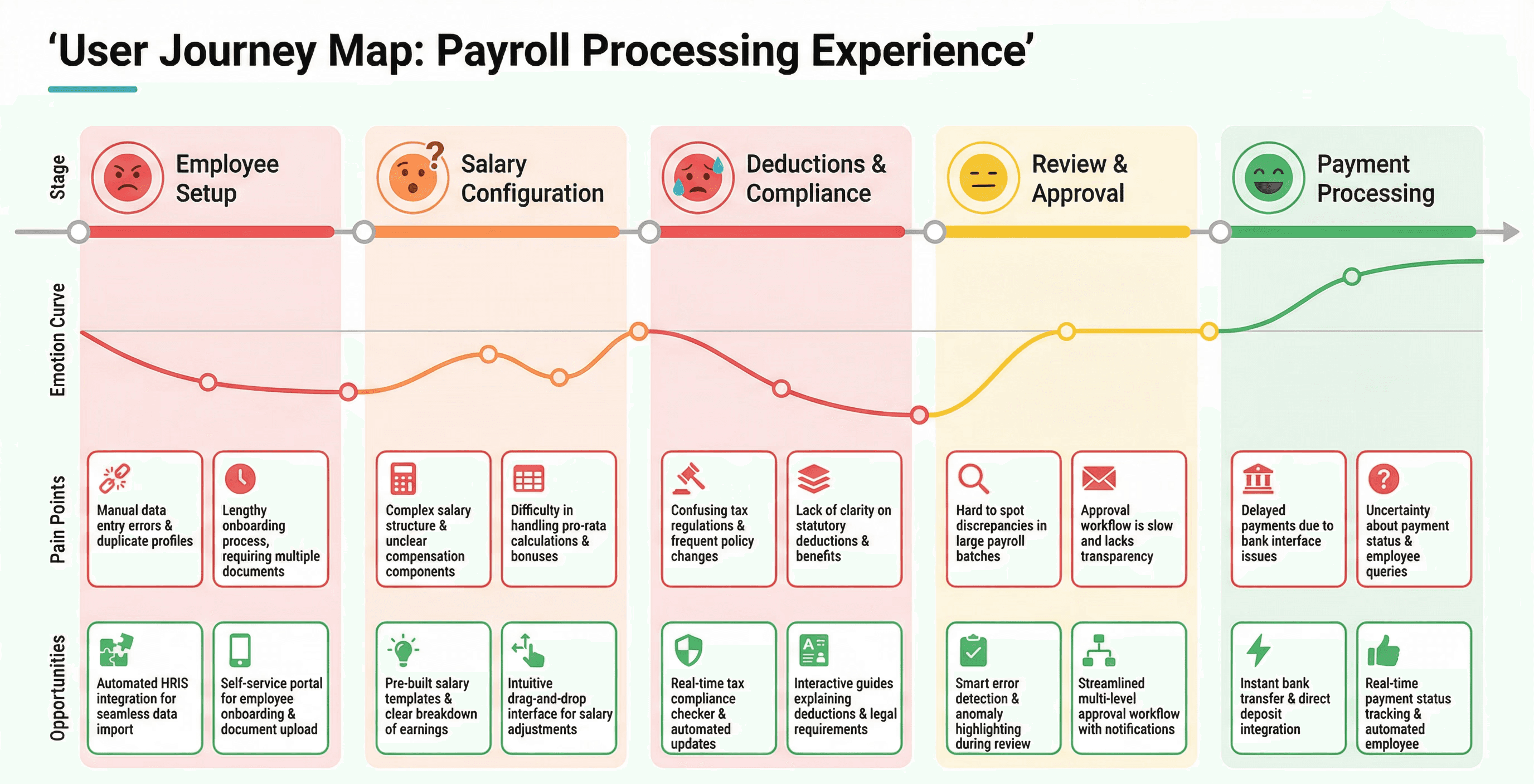
The journey map revealed that user frustration peaked during the Salary Configuration and Deductions & Compliance stages, precisely where the terminology barrier and compliance anxiety converged.
User Personas
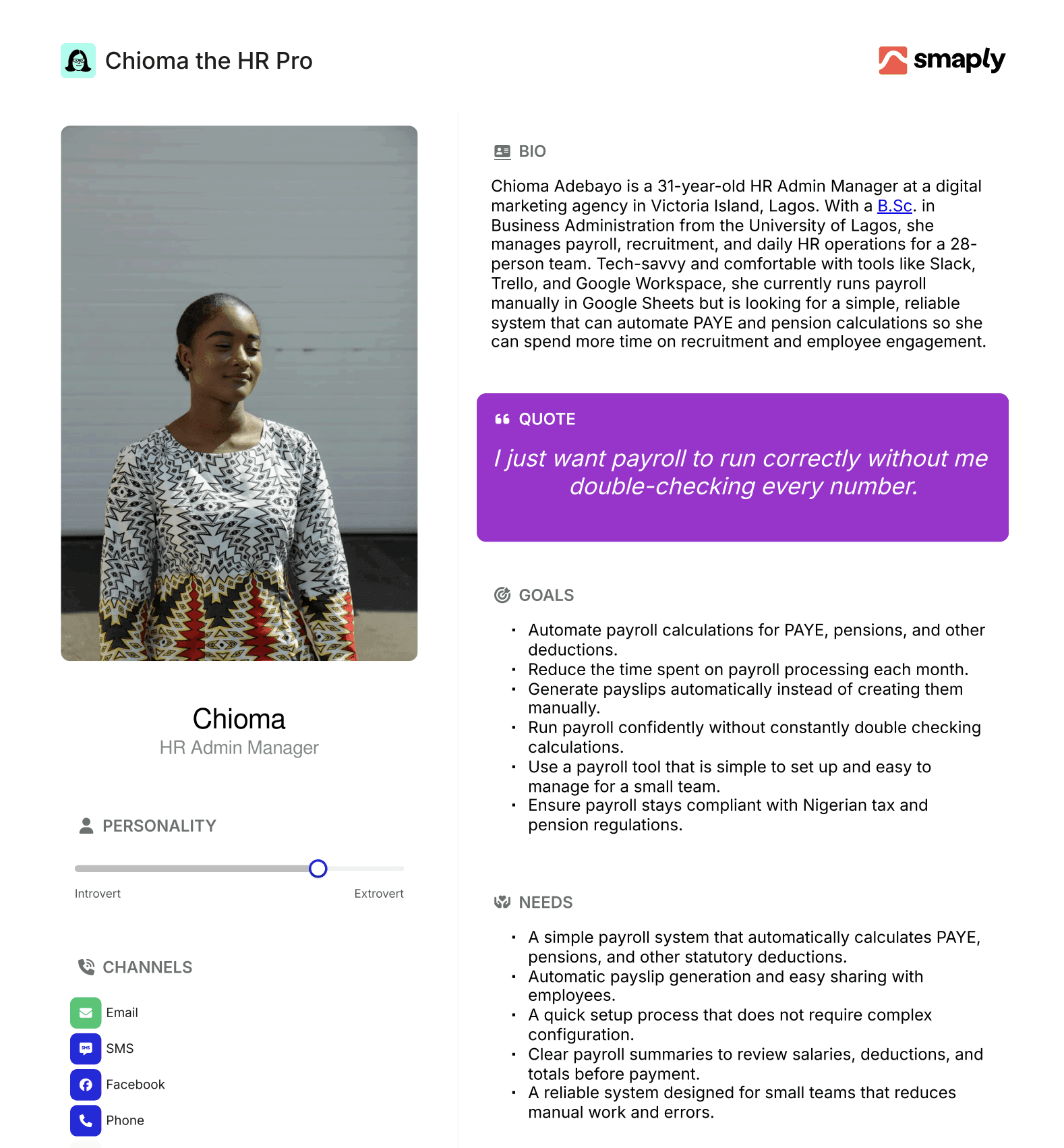
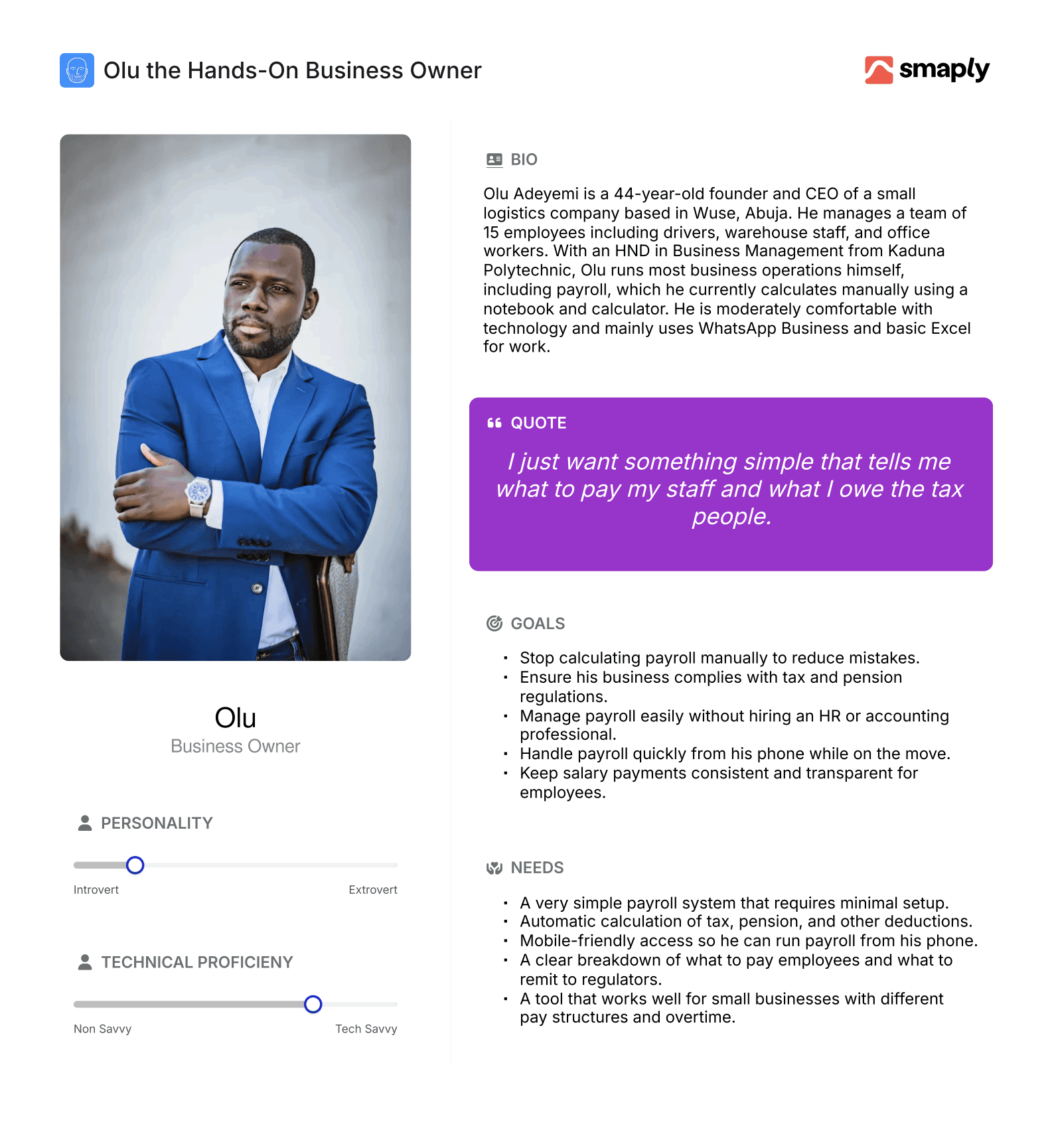
The research identified two primary personas representing distinct segments of the SME payroll user base.
Persona 1: Chioma Adebayo — The Overwhelmed HR Manager
Persona 2: Olu Adeyemi — The Hands-On Business Owner
Design Vision
Insight Synthesis
After synthesising the research findings, three strategic insights emerged that would shape the entire design direction.
Insight 1: Simplify the Language, Not the Capability. The core payroll calculations PAYE, pension, NHF are non-negotiable. But the way they are presented to users can be radically simplified. Users do not need to understand "consolidated relief allowance" to benefit from it. The system should handle complexity invisibly while presenting simple, human language to the user.
Insight 2: Build Confidence Through Progressive Disclosure. Rather than presenting all payroll configuration options upfront, the system should guide users through a step-by-step process that builds their confidence incrementally. Each step should explain what is happening and why, turning the payroll setup into a learning experience rather than an intimidating configuration task.
Insight 3: Mirror the Spreadsheet Mental Model. Instead of forcing users to adopt enterprise payroll thinking, the Mini Payroll feature should start from where users already are — a simple list of employees and their pay amounts. The system should then layer compliance and automation on top of this familiar foundation.
Design Principles
Based on these insights, the team established four design principles that guided every decision throughout the project.
Principle | Description |
Plain Language First | Every label, instruction, and message must be understandable by someone with no HR or accounting background. If a compliance term must be used, it must be accompanied by a plain-English explanation. |
Smart Defaults, Easy Overrides | The system should pre-configure the most common payroll settings for Nigerian SMEs (current PAYE rates, standard pension contribution splits, NHF calculations) while allowing users to adjust when needed. |
Show the Math | Users should always be able to see how their employees' pay is calculated — what goes to the employee, what goes to tax, what goes to pension. Transparency builds trust. |
Celebrate Progress | Every completed step should be acknowledged. Users should always know where they are in the process, what they have accomplished, and what comes next. |
Design Process & Execution
Information Architecture
The first design decision was structural. The existing payroll module had a flat architecture with 23 top-level menu items. For Mini Payroll, the team designed a linear, wizard-based architecture with five clear stages.
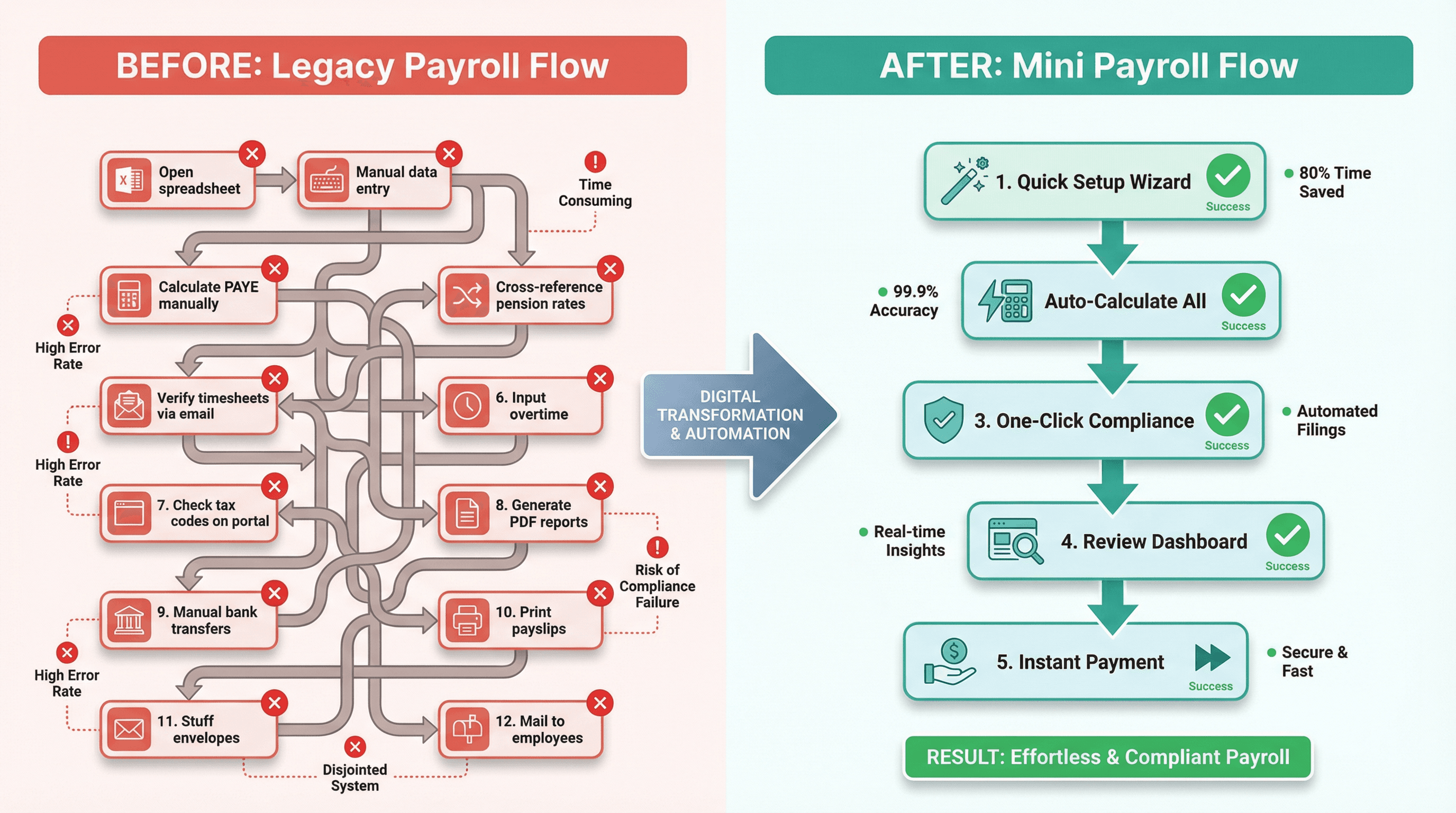
The legacy flow required users to navigate 12 disconnected steps across multiple screens. The Mini Payroll flow condensed this into 5 guided stages with automatic compliance handling.
Stage 1: Quick Setup Wizard
The Quick Setup Wizard replaced the previous 14-field company configuration form with a conversational, three-screen flow. The first screen asked only for the company name, number of employees, and pay frequency (monthly or bi-monthly). The second screen presented a simple toggle for each statutory deduction: "Do you remit PAYE tax?" "Do you contribute to employee pensions?" "Do you pay NHF?" with a brief, one-sentence explanation for each. The third screen confirmed the setup with a visual summary showing "Here's how payroll will work for your company."
The key design decision was to use smart defaults based on company size. For companies with fewer than 15 employees, the system defaulted to the most common configuration: monthly pay, PAYE enabled, pension enabled at the standard 8% employee / 10% employer split, and NHF disabled (as many small businesses are not yet enrolled). Users could change any of these with a single tap, but most did not need to.
Stage 2: Employee Roster
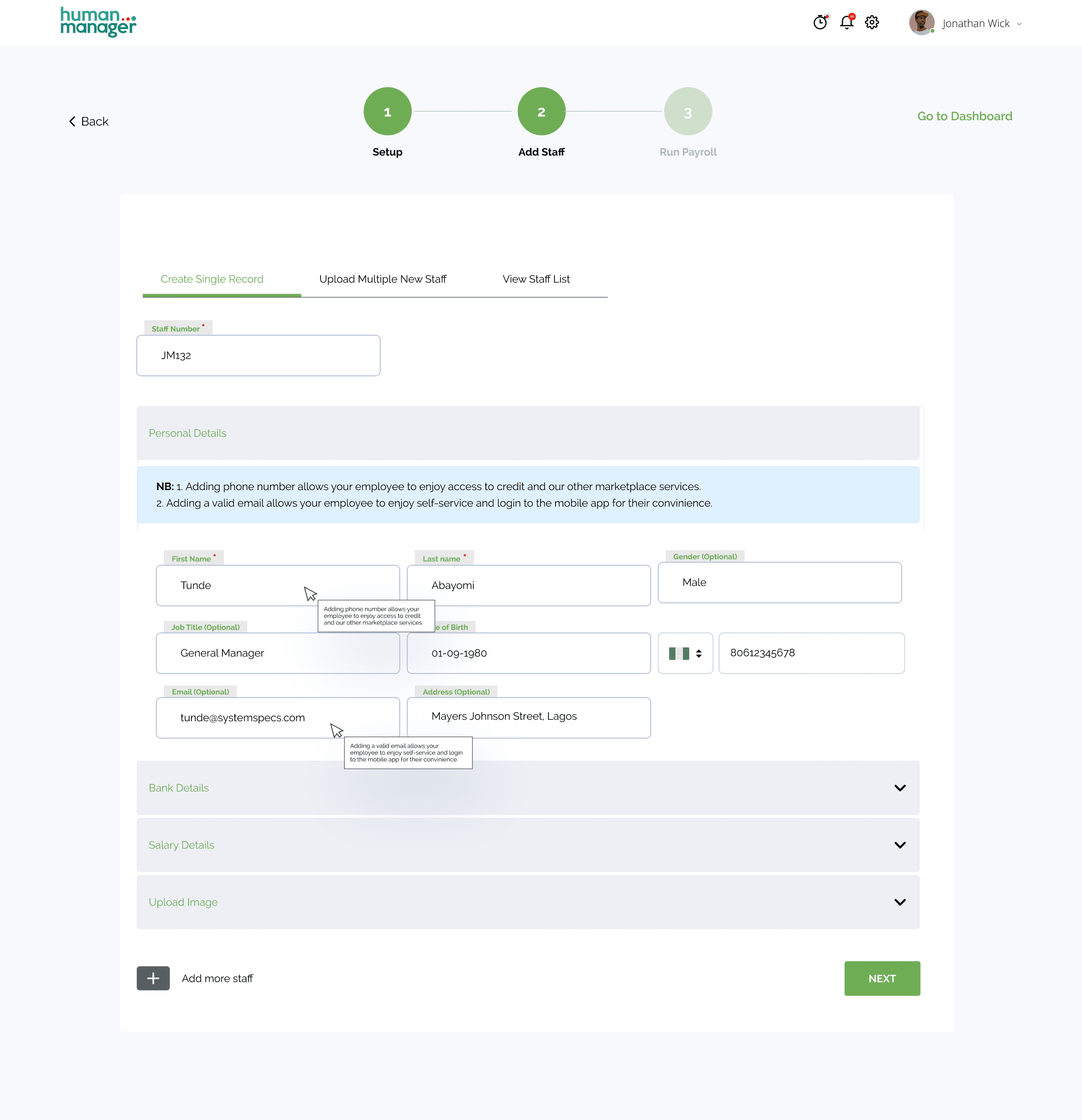
Rather than the enterprise module's detailed employee profile form (which had 47 fields), the Mini Payroll employee roster required only five essential fields: employee name, bank account number, bank name, monthly gross salary, and start date. The interface was designed to look and feel like a spreadsheet, a deliberate choice based on the research finding that 78% of users were coming from spreadsheet-based payroll.
A critical innovation was the "Add from spreadsheet" import feature. Users could paste data directly from their existing Excel or Google Sheets payroll, and the system would intelligently map columns to the required fields. During testing, this single feature reduced employee setup time from an average of 4.2 minutes per employee to 18 seconds.
Stage 3: Auto-Calculate & Compliance
This was the stage where Mini Payroll's intelligence became visible. Once employees and their gross salaries were entered, the system automatically calculated all statutory deductions using current Nigerian tax tables. The interface presented each employee's pay breakdown in a clear, visual format.
The "Show the Math" principle was implemented through an expandable breakdown card for each employee. The default view showed three numbers: gross pay, total deductions, and net pay. Tapping "See breakdown" revealed the full calculation PAYE (with the specific tax band highlighted), pension (employee and employer portions), and any other applicable deductions. Each line item included a small information icon that, when tapped, explained the calculation in plain language.
For example, rather than displaying "CRA: ₦200,000 or 1% of Gross Income + 20% of Gross Income, whichever is higher," the system showed: "Tax Relief: ₦58,333. This is a standard deduction that the government allows before calculating your tax. It's automatically applied to reduce the tax amount."
Stage 4: Review Dashboard
The Review Dashboard was designed as a single-screen summary that gave payroll approvers (typically the business owner or finance lead) complete visibility before committing to payment. It displayed the total payroll cost (broken down into net salaries, employer pension contributions, PAYE remittance, and other statutory payments), a list of all employees with their individual net pay amounts, and any flags or warnings (such as a new employee whose pension fund administrator had not been specified).
The dashboard also included a comparison with the previous month, showing changes in total payroll cost and highlighting any employees whose pay had changed. This feature addressed a common pain point identified in research: business owners often could not tell if their payroll numbers were "right" because they had no baseline for comparison.
Stage 5: One-Click Payment
The final stage leveraged HumanManager's integration with Remita's payment infrastructure. Users could initiate salary payments to all employees' bank accounts with a single click, directly from the Review Dashboard. The system processed payments through Remita's secure payment gateway, which supports direct transfers to any bank account in Nigeria.
After payment initiation, the system automatically generated digital payslips for each employee (accessible through the HumanManager self-service app), generated the PAYE remittance schedule for submission to the relevant State Internal Revenue Service, calculated and filed pension contribution schedules, and provided a downloadable payroll summary report in PDF format.
Interaction Design Details
Inline Validation with Guidance: Rather than showing error messages after submission, the system validated inputs in real-time and provided constructive guidance. For example, if a user entered a salary below the national minimum wage (₦30,000), the system displayed: "This amount is below Nigeria's current minimum wage of ₦30,000/month. You can proceed, but please confirm this is correct (e.g., for part-time staff)."
Contextual Help System: Every screen included a "Need help?" button that opened a contextual help panel with three layers: a brief explanation of the current step, a short video walkthrough (under 90 seconds), and a link to the full knowledge base article. Analytics later showed that 34% of first-time users engaged with the contextual help, but only 8% needed it on their second pay run.
Progress Persistence: The system saved progress automatically at every step, allowing users to leave and return without losing work. A "Continue where you left off" prompt appeared on the dashboard, addressing the time-poverty finding from research.
⚠️ Confidentiality Notice: Due to NDA and intellectual property restrictions from HumanManager, I’m unable to publicly share the full product experience. The screen below represents a small portion of the work and is included to highlight my design approach to the payroll feature.
Validation & Testing
Usability Testing Programme
The design was validated through three rounds of usability testing, each with specific objectives and success criteria.
Round | Participants | Focus | Key Metric |
Round 1: Concept Testing | 6 participants (2 per persona type) | Validate information architecture and wizard flow | Task completion rate for setup |
Round 2: Prototype Testing | 8 participants (mix of new and returning) | Test interaction patterns, language clarity, and error handling | Time to complete first pay run |
Round 3: Beta Testing | 42 businesses (real payroll data) | Validate end-to-end experience with real compliance calculations | Accuracy of calculations, support ticket volume |
Round 1 Results: The wizard flow tested well, with 5 of 6 participants completing setup without assistance. The primary issue identified was that the statutory deduction toggles on Screen 2 of the Quick Setup Wizard caused confusion — users were unsure whether toggling "Pension" on meant they were already remitting pension or wanted to start. The team revised the language from toggle labels to explicit questions: "Does your company currently contribute to employee pensions?" with Yes/No options and a "Not sure? Here's how to find out" link.
Round 2 Results: Average time to first pay run dropped to 22 minutes (from the 14-day average with the legacy system). The "Show the Math" breakdown was the most praised feature, with participants describing it as "finally understanding where the money goes." One critical issue emerged: the spreadsheet import feature failed to handle merged cells and non-standard date formats common in Nigerian Excel files. The engineering team added a data cleaning step with a preview screen showing how imported data would be mapped.
Round 3 Results: The 42-business beta programme ran for two complete payroll cycles. Calculation accuracy was 99.2% (the 0.8% discrepancy was traced to a rounding difference in PAYE calculation for employees earning above ₦3.2 million annually, which was corrected). Support ticket volume for beta users was 73% lower than the equivalent cohort using the legacy payroll module. Net Promoter Score among beta participants was 71.
A/B Testing
Following the beta, the team ran a controlled A/B test with new SME sign-ups over a four-week period. 50% of new users were directed to the legacy payroll module (Control), and 50% to the Mini Payroll feature (Treatment).
Metric | Control (Legacy) | Treatment (Mini Payroll) | Change |
Setup completion rate | 33% | 78% | +136% |
First pay run within 7 days | 18% | 72% | +300% |
Average setup time | 4.2 hours | 26 minutes | -90% |
Support tickets (per 100 users) | 31 | 7 | -77% |
30-day retention | 41% | 79% | +93% |
Strategic Impact
The Mini Payroll feature had ripple effects beyond its immediate metrics. It became the centrepiece of HumanManager's SME marketing campaign, with the tagline "Run payroll in 20 minutes, not 20 hours." The feature was highlighted at the 2023 "Breakfast with HumanManager" event, which was attended by industry leaders, including representatives from MTN, KPMG Nigeria, and EY. It also influenced the product roadmap: the progressive disclosure pattern and plain-language approach pioneered in Mini Payroll were subsequently adopted across other HumanManager modules, including Leave Management and Expense Claims.
Reflections & Learnings
What Went Well
Research-led design paid off. The four-week discovery period felt long at the time, but it prevented the team from building the wrong thing. The initial assumption from stakeholders was that SMEs needed "fewer features." Research revealed they needed the same features presented differently. This led to a fundamentally different design direction that would not have emerged without deep user engagement.
Cross-functional collaboration was strong. The compliance team's involvement from Week 1 ensured that every design decision was legally sound. The engineering team's early input on Remita payment integration shaped the one-click payment feature. The sales team's field insights about competitor positioning informed the onboarding messaging.
The spreadsheet import feature was a game-changer. This was not in the original brief. It emerged from a research insight and was championed through the design process despite initial engineering pushback about complexity. It became the single most cited reason users chose HumanManager over competitors in post-signup surveys.
What I Would Do Differently
Earlier mobile optimisation. The initial design focused on the desktop web experience, with mobile as a secondary consideration. However, analytics from the beta revealed that 41% of Mini Payroll users accessed the feature on mobile devices. This was significantly higher than the 22% mobile usage rate for the enterprise payroll module. The team had to retrofit responsive design decisions that would have been cleaner if planned from the start.
More attention to the empty state experience. The first time experience for users with zero employees entered was functional but not inspiring. A more thoughtful empty state, perhaps with a sample payroll walkthrough or interactive tutorial, could have further reduced the time to first value.
Deeper engagement with accountants and tax consultants. While the design focused on business owners and admin staff, many Nigerian SMEs rely on external accountants for payroll guidance. Understanding the accountant workflow and potentially designing a consultant view could have expanded the product's reach and created an advocacy channel.